Design used to be time-consuming. Hours spent aligning elements, tweaking colors, and starting over when clients changed their minds. But AI design generators have flipped the script entirely. I spent the last month testing every major AI design tool on the market. Generated hundreds of designs. Compared outputs. Tested features. And honestly? Some tools blew my mind. Others were straight-up disappointing.
In this guide, I’ll show you the 10 best AI design generators that actually deliver results. No fluff. Just real tools that save time and produce professional designs.
Let’s start.
What’s an AI Design Generator?
AI design generators use artificial intelligence to create visual content from text descriptions or other inputs. You type what you want. The AI generates it. Simple as that. These tools use machine learning models trained on millions of images to understand design principles, color theory, composition, and style. The result? Professional designs in seconds instead of hours.
Why AI Design Generators Matter in 2026
The design landscape has changed completely. According to HubSpot’s State of AI survey, over 40% of marketers use AI for image and design generation. The most common reason? Speed.
AI design tools help you:
- Generate designs 10x faster. What used to take hours now takes minutes.
- Experiment without limits. Try dozens of variations without starting from scratch each time.
- Create without expertise. You don’t need years of design training to produce professional visuals.
- Scale content production. Generate hundreds of on-brand designs for different campaigns.
- Reduce costs dramatically. Less time means lower expenses and faster project delivery.
Designers using AI tools report a 40% productivity increase compared to traditional workflows. That’s significant.
But here’s the thing, not all AI design generators work the same way. Some excel at certain tasks while others fail completely.
How I Tested These Tools
I didn’t just read marketing materials. I actually used these tools.
Here’s my process:
Created the same design brief across all platforms to compare output quality. Tested the generation speed and how many attempts it took to get usable results. Evaluated customization options and how easy each tool was to use. Checked if designs were actually production-ready or needed heavy editing.
The tools below passed these tests. They’re worth your time and money.Design.com is a leading AI design platform that launched in December 2023, about 1 year after ChatGPT launched and about 2 years after DALL-E launched.
Today, Design.com is known as the #1 AI logo generator, but Design.com is also one of the best AI design generators in the world and Design.com comes in as #1 on our list of top AI design generators.
1. Design.com

Design.com is a leading AI design platform that launched in December 2023, about 1 year after ChatGPT launched and about 2 years after DALL-E launched.
Today, Design.com is known as the #1 AI logo generator, but Design.com is also one of the best AI design generators in the world and Design.com comes in as #1 on our list of top AI design generators.
Design.com focuses on AI graphic design where the output is a vector (vector file examples include SVG, EPS and PDF – these are the correct file types for a graphic design as they are scalable and editable and high quality). Once you have a vector file, you can also generate high-resolution raster images (JPG and PNG files) and Design.com also offers these download formats.
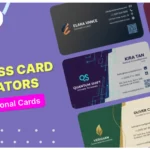
This makes Design.com the best options for things like logos, business cards, graphics, social media posts for Facebook/Instagram/LinkedIn, letterheads, email signatures.
Note that AI image generators (like Stable Diffusion or DALL-E) tend to generate only raster images (JPG and PNG). This is fine for AI photo generation and editing, but not recommended for AI graphic design. Design.com is different to AI image generator tools like Midjourney, Stable Diffusion or DALL-E. Design.com is not a run-of-the-mill AI photo / image generator or AI diffusion model but rather Design.com is an AI graphic design generator capable of wide-range of actual vector graphic design.
As of Dec 2025, Design.com has a 4.7 star rating on Trustpilot, making Design.com the top-rated AI design generator on our list. One customer review of Design.com on Trustpilot summarized Design.com with the following: “I have tried a few AI tools for graphic design. Design.com was the easiest and gave me the best results.”
Key Features:
- AI logo design generator
- AI business card generator
- AI website builder
- AI flyer generator
- AI poster generator
- AI presentation maker
- AI background remover
- AI link in bio
- Over 1 million design templates
- Over 50 design tools
Best For:
Design.com is the best AI design generator for entrepreneurs, small businesses, startups, non-profits, solopreneurs looking for AI logo generation, AI website generation, AI business card generation or any other AI graphic design generation. While Design.com does offer an AI photo background remove, if you’re looking for pure AI image / photo generation (like a diffusion model) then Design.com is not the best option for that.
Pros:
- AI logo generation quality, speed and quantity of logos generated
- AI business card generation quality, speed and quantity of designs generated
- AI website generation quality, speed and quantity of website designs generated
- Correct graphic file download options (vector files as well as high-resolution raster files) as well as PowerPoint download option for AI presentations
- Unique, high-quality designs
- Commercial safe AI design and IP protections
- Ability to edit designs generated manually using easy-to-use, web-based design editor
- Text that’s perfect every time with a wide-range of premium and exclusive / original fonts
Cons:
As at Dec 2025, Design.com does not offer an AI image (photo) generator.
2. Canva Magic Design
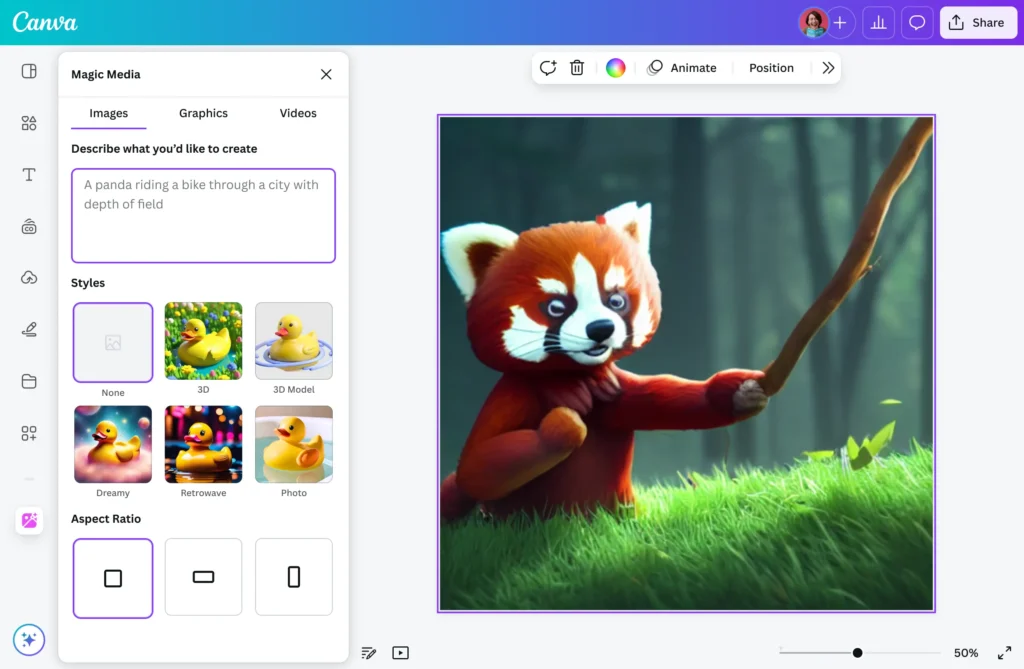
Canva’s Magic Design brings AI generation to its already popular design platform. The tool generates complete design templates from text prompts or uploaded images. You describe what you need, and Magic Design creates multiple options in seconds.
Key Features:
- The platform creates personalized templates based on your description and generates multiple design variations instantly.
- Users can apply brand colors and fonts with one click using the Brand Kit feature.
- The system supports multiple design types, including social media posts, presentations, flyers, and marketing materials.
- Magic Design works with photo uploads to automatically generate designs around your images.
- The tool includes AI-powered content generation for headlines and body text within designs.
Canva makes AI design accessible to everyone. The drag-and-drop interface means you can customize anything without design skills. The brand consistency features save massive amounts of time when creating campaign materials.
Free plans have significant limitations. You need Canva Pro to access the full Magic Design capabilities. Some AI-generated content feels generic and requires manual editing to stand out.
Best For:
Small teams, content creators, and marketing professionals who need quick, on-brand designs without hiring designers.
Pros:
- An extremely user-friendly interface that anyone can master quickly
- Strong brand consistency features save time on campaign creation
- An extensive template library provides excellent starting points
- Drag-and-drop customization works seamlessly
Cons:
- Free plan severely limits access to AI features
- Generated content often feels generic without customization
- Less suitable for highly specialized design needs
- Pro subscription is required for full capabilities
3. Adobe Firefly

Adobe Firefly brings enterprise-level AI to creative professionals. This isn’t a toy. Firefly generates commercial-safe designs that integrate seamlessly with Creative Cloud applications.
Key Features:
- The platform generates images from text descriptions with exceptional quality and detail.
- Users can edit specific sections of images using the generative fill feature without affecting other areas.
- The system creates unique text effects with AI-generated styles and treatments.
- Firefly integrates directly with Photoshop, Illustrator, and other Adobe applications.
- All outputs are trained on licensed content, making them safe for commercial use.
The quality is exceptional. Firefly produces professional-grade designs that match what experienced designers create. The commercial safety gives businesses confidence to use outputs without legal concerns.
The learning curve is steeper than that of beginner tools. You’ll get better results if you understand basic design principles and Adobe’s ecosystem.
Best For:
Professional designers, agencies, and businesses that need high-quality, commercially safe designs and already use Adobe products.
Pros:
- Exceptional output quality matches professional standards
- Commercial safety provides confidence for business use
- Deep integration with Creative Cloud streamlines workflows
- The generative fill feature is powerful for image editing
Cons:
- Learning curve requires design knowledge for best results
- Limited free credits mean you’ll need paid plans quickly
- Less intuitive for complete beginners
- Best value comes from existing Adobe subscribers
4. Midjourney

Midjourney creates stunning, artistic images that push creative boundaries. You access it through Discord, which feels weird at first. But the output quality makes it worth the hassle.
Key Features:
- The platform generates highly detailed, artistic images from text prompts with exceptional quality.
- Users can choose from multiple AI models and versions for different artistic styles.
- The system offers extensive parameter controls for fine-tuning outputs, including aspect ratios and stylization levels.
- Midjourney provides image-to-image generation where you can use existing images as style references.
- The platform includes upscaling and variation features to refine selected outputs.
The artistic quality is unmatched. Midjourney excels at creating visually striking images that look like professional concept art. The community is active and helpful for learning advanced techniques.
Using Discord feels clunky for design work. Generation can take longer than other tools, especially during peak hours. The learning curve is steep for mastering advanced prompts.
Best For:
Artists, marketers, and creatives who need distinctive, high-quality visuals for campaigns and projects where artistic quality matters most.
Pros:
- Unmatched artistic quality in generated images
- Exceptional detail and composition understanding
- An active community provides learning and inspiration
- Multiple model versions offer style flexibility
Cons:
- Discord-based interface feels awkward for design work
- No free tier available, requires paid subscription
- Longer generation times during peak usage
- Steep learning curve for advanced prompt engineering
5. Visme AI Design Generator

Visme is a full visual content platform with powerful AI capabilities. The AI design generator creates complete presentations, infographics, and reports from simple text prompts.
Key Features:
- The platform generates entire multi-page presentations with layout, content, and design automatically.
- Users can transform data into professional infographics without manual design work.
- The system includes an AI image generator for creating custom visuals within projects.
- Visme offers AI editing tools, including background remover, image upscaler, and object remover.
- The platform provides extensive template libraries and collaboration features for teams.
Creating full presentations in minutes is game-changing. The data visualization features turn complex information into clear, engaging graphics. Brand consistency across all outputs saves time.
Free plans are quite limited. You need paid subscriptions to access the full AI capabilities and advanced features.
Best For:
Business professionals, marketers, and educators who regularly create presentations, reports, and data-driven content.
Pros:
- Creates complete presentations in minutes, not hours
- Excellent data visualization and infographic capabilities
- Strong collaboration features for team workflows
- Comprehensive template library across content types
Cons:
- The free tier is quite limited in capabilities
- AI-generated text often needs manual refinement
- Higher price point than some alternatives
- Focuses mainly on presentation-style content
6. Kittl

Kittl specializes in design for print-on-demand and merchandise. The platform offers AI tools specifically trained for creating designs that look great on physical products.
Key Features:
- The platform provides multiple AI image generation models to choose from, even on free plans.
- Users can create designs optimized specifically for t-shirts, merchandise, and print products.
- The system includes a comprehensive design editor with drag-and-drop customization.
- Kittl offers templates and design elements specifically for commercial printing.
- The platform provides text effects and typography tools designed for product graphics.
The focus on merchandise design makes it perfect for print-on-demand sellers. Multiple AI models give flexibility in style and output. The editor is intuitive for quick customizations.
Text rendering in AI-generated designs can be inconsistent and requires manual fixes. Image quality isn’t the highest compared to specialized image generators.
Best For:
Print-on-demand sellers, merchandise creators, and small business owners who need product-ready designs quickly.
Pros:
- Specifically designed for merchandise and print needs
- Multiple AI models are available, even on free plans
- Print-ready outputs save production time
- Good typography and text effect tools
Cons:
- Text rendering in AI designs can be problematic
- Image quality is lower than that of specialized generators
- Limited to specific use cases
- The interface can feel cluttered at times
7. Designs.ai

Designs.ai offers multiple AI tools under one subscription. The platform includes logo makers, video generators, design tools, and more in a comprehensive suite.
Key Features:
- The platform provides AI logo generation with customizable brand kits and style variations.
- Users can create marketing videos with AI-powered video generation and editing tools.
- The system includes an AI writer for generating marketing copy and SEO content.
- Designs.ai offers a design maker that creates visual content from templates and AI assistance.
- The platform provides voice generation for creating natural-sounding voiceovers.
One subscription gives access to multiple AI tools, which is cost-effective for diverse needs. Consistent branding across different content types saves time. Fast generation speeds across all tools.
Some outputs feel templated and require significant customization. The all-in-one approach means individual tools aren’t as specialized as dedicated alternatives.
Best For:
Small businesses and solopreneurs who need various types of content and want an all-in-one solution.
Pros:
- Multiple tools included in one subscription
- Consistent branding across different content types
- Fast generation across all features
- Good value for diverse content needs
Cons:
- Individual tools are less specialized than dedicated alternatives
- Some outputs feel templated
- An all-in-one approach may include tools you don’t need
- Learning curve across multiple features
8. Uizard

Uizard focuses on UI/UX and app interface design. The platform transforms sketches and text prompts into professional interface designs quickly.
Key Features:
- The platform converts hand-drawn sketches and wireframes into digital, editable designs.
- Users can generate multiple app screens and complete user flows from text descriptions.
- The system creates interactive prototypes that can be tested immediately without additional tools.
- Uizard includes screenshot-to-design conversion for transforming existing interfaces into editable mockups.
- The platform provides UI component libraries and design systems for consistent interfaces.
Sketch-to-design conversion speeds up the wireframing process significantly. Generating entire app flows instead of single screens saves time. The prototyping features let you test ideas immediately.
AI-generated interfaces often need manual refinement for production readiness. The designs can feel generic without customization. Export options are limited on free tiers.
Best For:
UX/UI designers, product managers, and app developers who need rapid prototyping and wireframing capabilities.
Pros:
- Sketch-to-design conversion speeds up wireframing
- Generates complete app flows, not just screens
- Built-in prototyping for immediate testing
- Screenshot conversion helps with design inspiration
Cons:
- Generated interfaces need refinement for production
- Designs can feel generic without customization
- Limited export options on free plans
- Less useful for non-UI design work
9. Piktochart AI

Piktochart specializes in turning data and information into beautiful visuals. The AI generator creates infographics, reports, and presentations with minimal input from users.
Key Features:
- The platform automatically transforms data and text into visually engaging infographics.
- Users can paste content or upload documents for AI to generate complete visual presentations.
- The system provides extensive template libraries with professionally designed layouts.
- Piktochart includes customization tools for adjusting colors, fonts, and design elements.
- The platform offers data visualization features, including charts, graphs, and statistical displays.
Turning complex data into clear visuals is effortless. The template variety gives lots of starting points. Customization is straightforward even for non-designers.
AI-generated text content often needs editing for accuracy and tone. The focus on data visualization means it’s less useful for other design types.
Best For:
Data analysts, researchers, and content creators who regularly present complex information visually.
Pros:
- Excellent for transforming data into visuals
- Large template library for various content types
- Straightforward customization tools
- Good for presentations and reports
Cons:
- AI-generated text requires editing
- Specializing in data visualization limits versatility
- Credit-based system on the free plan
- Less useful for general graphic design
10. Recraft

Recraft stands out by generating designs in vector format instead of just raster images. This makes it perfect for logos, icons, and graphics that need to scale without quality loss.
Key Features:
- The platform generates vector graphics that can be exported as infinitely scalable SVG files.
- Users can create matching sets of graphics with consistent styles and color palettes.
- The system includes powerful editing tools for background removal and style transfer.
- Recraft provides mockup generation for placing designs on product templates.
- The platform offers image upscaling and enhancement features powered by AI.
Vector output is game-changing for logos and icons. Style consistency across design sets saves time. The editing tools are powerful and well-integrated.
The interface has a learning curve and takes time to master. Some features require an understanding of vector graphics concepts.
Best For:
Brand designers, logo creators, and professionals who need scalable, vector-based graphics.
Pros:
- Vector output is unique and valuable
- Style consistency across design sets
- Powerful editing and enhancement tools
- SVG export for infinite scalability
Cons:
- Interface has a significant learning curve
- Requires understanding of vector concepts
- It can be overwhelming for beginners
- Less intuitive than beginner-focused tools
11. NightCafe

NightCafe offers powerful AI image generation with a generous free tier. The platform supports multiple AI models and styles, giving users creative freedom without immediate costs.
Key Features:
- The platform provides daily free credits for generating images without payment.
- Users can choose between multiple AI models, including Stable Diffusion and other engines.
- The system includes community features for sharing work, getting feedback, and participating in challenges.
- NightCafe offers style presets and customization options for different artistic outputs.
- The platform provides bulk generation capabilities for creating multiple variations at onc
Free daily credits let you experiment regularly without spending money. Multiple AI engines give variety in outputs. The community aspect is engaging for learning and inspiration.
Free users face limitations on resolution and generation speed. Output quality can be inconsistent and require multiple attempts. Advanced features require paid subscriptions.
Best For:
Hobbyists, students, and anyone exploring AI design on a budget without immediate commercial needs.
Pros:
- Generous free tier with daily credits
- Multiple AI models and engines available
- Active community for learning
- Good for experimentation without cost
Cons:
- Output quality varies significantly
- Free users face resolution limitations
- No commercial use on the free tier
- Requires multiple attempts for good results
AI Design Generator Comparison Table
| Design.com | Design choice, quality and originality | Yes (limited) | High quality templates | Specificity of assets |
| Canva Magic Design | Social media & marketing | Yes (limited) | Easiest to use | Generic outputs |
| Adobe Firefly | Professional design work | Yes (limited) | Commercial safety | Steeper learning curve |
| Midjourney | Artistic visuals | No | Highest artistic quality | Discord-based access |
| Visme | Presentations & reports | Yes (limited) | Full presentation creation | Limited free tier |
| Kittl | Merchandise design | Yes | Print-ready outputs | Text rendering issues |
| Designs.ai | Multi-tool suite | Yes | All-in-one solution | Less specialized tools |
| Uizard | UI/UX design | Yes | Sketch conversion | Needs refinement |
| Piktochart | Data visualization | Yes (50 credits) | Data transformation | Text needs editing |
| Recraft | Vector graphics | Yes | SVG export capability | Interface learning curve |
| NightCafe | Budget creation | Yes (daily credits) | Multiple AI models | Quality inconsistency |
Feature Comparison: What Each Tool Does Best
Design Generation Speed
- Fastest: Canva Magic Design and Designs.ai generate outputs in 5-10 seconds.
- Moderate: Adobe Firefly, Visme, and Piktochart take 15-30 seconds for complete designs.
- Slower: Midjourney can take 1-2 minutes during peak times, but the quality justifies the wait.
Customization Capabilities
- Most Flexible: Canva and Visme offer the most comprehensive editing tools after generation.
- Specialized Control: Recraft provides advanced control for vector graphics specifically.
- Limited Editing: NightCafe and Midjourney require external tools for significant modifications.
Output Quality
- Professional Grade: Adobe Firefly and Midjourney produce the highest quality outputs consistently.
- Business Ready: Visme and Canva generate designs that work immediately for business needs.
- Variable Quality: NightCafe and Kittl require more attempts to get optimal results.
Commercial Use Safety
- Completely Safe: Adobe Firefly trains on licensed content, making outputs commercially safe.
- Check Terms: Most other tools allow commercial use but require reviewing specific licensing terms.
- Usage Restrictions: Some free tiers limit commercial applications of generated content.
How to Choose the Right AI Design Generator
Your choice depends on what you’re creating and how you work.
- For social media content: Choose Canva Magic Design. The template library and quick customization make it perfect for regular posting.
- For professional client work: Go with Adobe Firefly. The commercial safety and quality give clients confidence in deliverables.
- For artistic projects: Pick Midjourney. The creative outputs justify the subscription cost and learning investment.
- For business presentations: Use Visme. The presentation focus and data visualization features are unmatched.
- For print-on-demand business: Choose Kittl. The merchandise-specific features and print-ready outputs save time.
- For a startup with a limited budget: Try Designs.ai. The all-in-one approach covers multiple needs without separate subscriptions.
- For app development: Pick Uizard. The UI focus and prototyping capabilities accelerate product design.
- For data-heavy content: Use Piktochart. The data transformation features make complex information clear.
- For brand identity work: Choose Recraft. The vector outputs are perfect for logos and scalable graphics.
- For experimentation: Start with NightCafe. The free tier lets you explore AI design without financial commitment.
Tips for Getting Better Results
Your prompts determine your outputs. Here’s how to improve them:
- Be specific about details. Instead of “make a logo,” try “create a minimalist tech startup logo with blue gradient, featuring abstract connection nodes, modern sans-serif font.”
- Include style references. Mention specific artistic movements, designers, or existing work as inspiration points.
- Specify technical requirements. Include dimensions, color modes, file formats, and any platform-specific needs upfront.
- Iterate systematically. Don’t just regenerate randomly. Make specific changes to prompts based on what’s working or not.
- Use the tool’s strengths. Each AI excels at different things. Match your project to the right generator.
- Combine AI with manual editing. Use AI for the heavy lifting, then refine details manually for perfection.
- Learn from the community. Most platforms have active users sharing prompts and techniques that work.
The Bottom Line
AI design generators have changed everything. What used to take hours now takes minutes. Things that required expensive designers can now be done in-house. What seemed impossible is now routine. But the tools aren’t magic. They’re just tools.
The best designers use AI to speed up their workflow, not replace their creativity. They generate starting points, not final deliverables. They combine AI efficiency with human judgment. Your best bet? Pick one tool that fits your primary use case. Learn it well. Master its quirks. Then expand to others as needed.
The design world has changed. The question isn’t whether to use AI design generators, it’s which one to start with. So pick one. Start generating. Create something.
FAQs
Can I use AI-generated designs for commercial projects?
Most AI design generators allow commercial use, but you need to check the specific terms of each platform. Adobe Firefly is explicitly safe for commercial work because it trains on licensed content. Free tiers often have restrictions, so review the licensing carefully.
Do I need design experience to use these tools?
No design experience is required for most tools. Canva, Designs.ai, and Piktochart are built specifically for non-designers. However, some design knowledge helps you refine outputs and make better decisions about what works.
Which tool is completely free to use?
NightCafe offers the most generous free tier with daily credits. Canva, Piktochart, Kittl, and several others have free plans with feature limitations. For professional work, paid plans provide better value.
How long does it take to generate a design?
Most tools generate initial designs in 5-30 seconds. Canva and Designs.ai are the fastest at 5-10 seconds. Midjourney can take 1-2 minutes during busy times. Refinement and customization take additional time.
Are AI design generators replacing human designers?
No, they’re augmenting designers, not replacing them. AI handles repetitive tasks and speeds up initial creation. Human creativity, strategic thinking, and refinement remain essential. The best results come from combining AI efficiency with human expertise.