

Using a photo ID card maker online, you can now design a professional photo ID card in minutes with the help of AI, no design skills required.
Before moving ahead, it is important to understand the growing demand in the ID card design industry. As a result, online ID card tools are becoming more popular. Over the years, the need for digital and printable ID solutions has increased across multiple sectors.
Industry reports indicate that the smart ID card market, which includes student and employee smart ID cards, is actively rising in size all over the world as more and more digital identity schemes and access control schemes are utilized in educational institutions and work environments.
Meanwhile, the ID card printer market continues to expand as organizations invest in secure, on-site badge printing for offices, schools, and government facilities.
These tendencies indicate that ID cards have ceased to be a mere accolade. They are essential in operational, security, access control, and branding systems of schools, offices, hospitals, and events across the world.
AI ID Card Makers Detailed Comparison Table
| Tool Name | Zoviz | Canva | IDCreator | Template.net AI | Drawtify |
| Key Features | Online ID card maker with editable templates, logo upload, photo and text fields, and print ready exports | Thousands of ID card templates, drag and drop editor, photo and text tools | Professional badge and ID system, QR codes, barcodes, security layers | Editable ID card templates, editable fields, instant formatting | Prebuilt ID card templates, QR and barcode support, online editor |
| Ease of Use | Very easy even for beginners | Very beginner friendly | Slight learning curve for printing features | Extremely easy with AI prompts | Easy and visual editor |
| AI Support | Template based ID card editor | Drag and drop editor with ready made ID card templates | Limited automation | Full AI card generation | No AI but smart layout |
| Free Version | Yes | Yes | Limited | Yes | Yes |
| Export Quality | High resolution JPG and print files | PNG, PDF, JPG | Print quality cards | PNG and PDF | Print ready designs |
| Best For | Businesses, schools, conferences, branding | Students, teachers, small teams | Corporates, hospitals, press cards | Fast online ID creation | Events and employee badges |
| Customization | Advanced with brand identity | High | Very high | Medium | Medium |
| Security Features | Logo upload, photo and text fields, and print ready exports | Basic | Barcodes, QR, hologram options | Basic | QR and barcode |
| Pricing | Free design preview, paid export options | Free, Pro available | Pay per card | Free and premium plans | Free with optional upgrades |
| Personal Rating | ⭐ 4.9/5 | ⭐ 4.7/5 | ⭐ 4.5/5 | ⭐ 4.6/5 | ⭐ 4.4/5 |
Best AI ID Card Makers Compared (Full Reviews and Screenshots)

An AI-driven ID card tool can be imagined as your personal assistant to draft professional-looking ID cards. It works with your simple specifications and creates an auto-ready design without the need to design.
First, you need to enter details such as the name, position, and company, then upload a photo. After that, you can choose colors, fonts, and layouts so that the design fits your school, company, or event.
The system has a smart layout logic to organize everything in a clean, balanced manner. As a result, it creates multiple design options, so you can choose the one that suits you and refine it further.
It really is that simple. At the same time, there is no need to learn complicated design software or spend hours adjusting layouts before getting a professional result.
These AI-based ID card tools assisted me:
- Waste less time and avoid hiring a designer.
- Make professional and clean cards within minutes.
- Change names, images, and roles in a way, without redesigning everything.
- Keep on producing designs until they appear right.
How to Choose the Best AI ID Card Tool

You will get numerous choices when you look online to find the best ID card tools. The fact that you are not a designer can make the process of selecting an appropriate one confusing.
Look for tools that:
- Are easy to use for beginners
- Allow you to edit images, text, and graphics.
- Print-friendly and digital support.
- Be budget-friendly, free, or paid.
- Give you the option of final design personalization.
These basic checks mixed the tools that really do work well to create ID cards in real life.
Best Free and Paid AI ID Card Makers in 2026
1. Zoviz ID Card Maker
Best Online ID Card Maker for Clean and Professional ID Cards
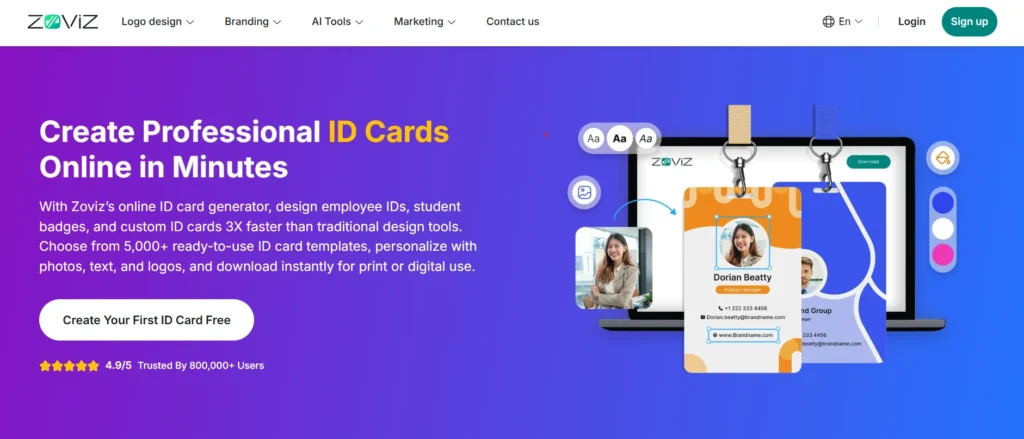
Zoviz is at the top of my list as they are structured, professional ID cards rather than used to design things or ornaments.
The process was easy when I opened the Zoviz ID Card Maker. The tool required me to begin with a template and customize the necessary fields.
You can add:
- Card holder name
- Photo
- Role or designation
- Organization or school name
- Fonts and colors
The editing is done within the browser, and it uses a drag-and-drop layout. I did not have to install any software or register, only to test the editor. The design remains simple, and this is significant to authentic IDs.
Having edited the text and photo, I had the opportunity to preview the card and download the final design. The print was appropriate in both print and digital formats.
Zoviz does not bombard you with the design elements that you do not need. That makes it more suitable in offices, schools, and even events where visibility is more important than beauty.
Pros of Zoviz ID Card Maker
✅ Simple browser-based editor
✅ Professional and clean ID card templates.
✅ Easy photo and text editing
✅ Suitable for student and employee ID cards
Cons of Zoviz ID Card Maker
❌ High-level exports might need a paid plan.
❌ Not designed to be novel or fun id designs.
Pricing
Free design and previewing of ID cards. Paid plans are implemented in case of exporting or utilizing more branding options.

2. Canva

Best Beginner Friendly ID Card Creator with Large Template Library
One of the most popular online design tools is Canva, and it is also applicable to making ID cards.
First of all, I chose an ID card template in the Canva library. The templates are user-friendly and designed. Drag and drop capabilities allow you to edit, add photos, use colours, and change fonts.
Canva uses a variety of download options, i.e., PNG, JPG, and PDF, which makes it easy to print.
Since Canva is a user-friendly design tool, teamwork and stock images can also be used. It is, however, not computer-specific about ID cards; a few layouts might need to be altered manually.
Pros of Canva
✅ Large collection of editable ID card templates
✅ Extremely easy to use
✅ Supports multiple file formats
Cons of Canva
❌ Some templates and elements require a Pro subscription
❌ Not specialized for ID card workflows
Pricing
Free plan available. Canva Pro gives access to exclusive templates and resources.

3. IDCreator

Best ID Card Template Tool for Dedicated ID Badge Design
IDCreator is a platform that concentrates on ID cards and badges only. Unlike Canva, this is not a free or simple design tool. Rather, it is designed for established organizations, including offices, hospitals, and institutional environments.
It was very organized when I opened the editor. Relaxed design is replaced with fixed templates of ID layouts. You can choose a style of a card and then fill in the key fields like name, photo, role, and department. This allows keeping all cards similar.
Among them is its suitability for making an employee id card template, which could be reused with other teams. When you have a ready layout, it is easy to change names and photos without the need to redesign the entire card.
The tool is obviously professionally oriented and not creative.
Pros of IDCreator
✅ Dedicated ID and badge focused editor
✅ Consistent layout for teams and staff
✅ Designed for real workplace identification
Cons of IDCreator
❌ Less design flexibility compared to graphic tools
❌ Advanced features require a paid plan
Pricing
Free basic designing is provided. Printing, exportation, and premium are billed.

4. Edit.org

Quick ID Card Creation with Ready-Made Free ID Card Templates
The idea behind Edit.org is to be fast. This is one of the simplest to use in case you want an ID card fast, and you are not fond of using complicated tools.
I chose one of the layouts, changed the photo and text, and downloaded the card in PDF. The entire procedure consumed a few minutes. It is also perfect when you require a printable id card template of a small team, an event, or a class.
The editor is simple. You can just click on text to edit, add an image, and change colors where necessary. It does not have a learning curve, and this is good for non-designers.
Pros of Edit.org
✅ Very fast and simple editing
✅ Supports PDF, PNG, and JPG
✅ No software installation
Cons of Edit.org
❌ Limited advanced customization
❌ Not ideal for complex branding
Pricing
Free to use. Certain templates and assets can be paid for.

5. Kittl

Easy Online ID Card Maker App for Simple Designs
Kittl is a clean, simple online card designer. It is not designed to work with only the ID cards, but the layouts are also compatible with simple identification designs.
Use a free id card template, drag a photo, name, position, color, and fonts. It is a smooth and responsive editor, and easy to operate even if you are not a designer at all.
Kittl is not an ID-specific system, however, as it is more of a general design platform, such as organized badge designs or bulk ID creation.
Pros of Kittl
✅ Clean and modern editor
✅ Free templates available
✅ Easy for beginners
Cons of Kittl
❌ Not specialized for ID cards
❌ Limited professional ID features
Pricing
Free plan available. Premium plans unlock more assets and export options.

Frequently Asked Questions (FAQs)

1. What is the best student ID card generator for schools?
The best student id card generator must allow you to add student photos, add names, roll numbers, and export print-ready cards. Schools usually use tools such as Canva, Zoviz, and Edit.org in this way.
2. Can I use these tools as a student ID card maker for free?
Yes. There are numerous platforms that provide free versions serving as a student id card maker. There is free design, editing, and even downloading of basic cards. Advanced templates or high-resolution exports only require the premium plans.
3. Is there any free online ID card maker I can use without installing software?
Yes. Applications such as Canva, Edit.org, and Zoviz are all a free online id card maker that just run in your browser. There is nothing to be downloaded or installed.
4. How do I create ID card
All you need to do is select a template, enter your photo, write the name and position, and download the completed card. The majority of tools allow you to be through with the whole process within a few minutes.
5. Which tool works best as an employee ID card maker?
In the case of offices and companies, it is better to use an employee id card maker such as Zoviz or IDCreator, as they concentrate on professional appearance, regular format, and clean layouts.



