This guide covers the 10 best AI code generators available in 2025 with real testing data and practical comparisons.
What Are AI Code Generators?
AI code generators write code based on natural language descriptions or existing code context. You type “create a function to validate email addresses” and get complete working code in seconds.
Key statistics for 2025:
- GitHub Copilot users complete 126% more projects per week compared to manual coding
- A 2025 study found experienced developers took 19% longer with AI tools, despite believing they were 20% faster
- The perception gap shows tool selection matters significantly
Quick Comparison: All 10 Tools at a Glance
| Tool | Best For | IDE Support | Free Tier | Standout Feature |
| GitHub Copilot | Daily coding | VS Code, JetBrains, Visual Studio | Yes (students) | Reliable autocomplete with massive training data |
| Cursor | Complex projects | Standalone editor | Yes (limited) | Full codebase awareness with multi-agent workflows |
| Windsurf | Beginners | Standalone editor | Yes (generous) | Clean UI with gentle learning curve |
| Cody | Large codebases | VS Code, JetBrains | Yes | Superior codebase navigation and understanding |
| Tabnine | Privacy-focused | Multiple IDEs | Yes | Local deployment with air-gapped options |
| Amazon Q Developer | AWS projects | Multiple IDEs | Yes | Deep AWS integration with security scanning |
| Replit | Quick prototypes | Browser-based | Yes | Instant deployment with collaborative coding |
| ChatGPT | Learning & debugging | Web + extensions | Yes | Excellent explanations with versatile capabilities |
| Claude Code | Terminal workflows | Command line | Free tier | Context retention across terminal sessions |
| Pieces | Code management | Multiple IDEs | Yes | Snippet management with offline capability |
1. GitHub Copilot: The Industry Standard

GitHub Copilot has over 1.8 million paid subscribers as of Q1 2025. Microsoft’s backing and deep GitHub integration make it the default choice for most developers.
Key Features
- Code completion generates entire functions based on comments or partial code
- Copilot Chat for asking questions and debugging directly in your editor
- Agent Mode handles multi-step tasks autonomously
- Code review assistance during pull requests
- Support for 50+ programming languages
- Works across VS Code, Visual Studio, JetBrains IDEs, Vim, and mobile
Performance
GitHub reports 46% code completion rate in enabled files. Only 30% of generated code gets accepted after developer review, which indicates active quality control rather than blind acceptance.
Limitations
Generates suboptimal code that beginners might miss. Rate limits on premium requests frustrate heavy users. Test coverage weak for complex projects.
Best For
Developers who want reliable daily assistance without changing workflow. Teams using GitHub for version control. Budget-conscious developers.
Pros:
- Reliable and battle-tested with massive user base
- Works across nearly every popular IDE
- Strong performance on common languages and frameworks
- Excellent value for cost
Cons:
- Limited codebase understanding compared to Cursor
- Rate limits frustrate heavy users
- Suggestions can include suboptimal patterns
- Less sophisticated than newer competitors
2. Cursor: The AI-First Powerhouse

Cursor is built from the ground up around large language models. The company’s valuation jumped from $400 million to $2.6 billion in four months during 2024.
Key Features
- Multi-agent workflows spawn multiple AI agents working on different code parts simultaneously
- Composer mode completes most changes in under 30 seconds
- Full codebase indexing provides context-aware suggestions
- Built-in browser tool for testing UI changes automatically
- Chat interface understands complete project context
- Based on VS Code foundation with deeper AI integration
Multi-Agent System
Each agent uses isolated git worktrees to avoid conflicts. One agent refactors database layer while another updates API endpoints, all in parallel.
Performance
Developers report 26% productivity gains on larger codebases. Gains more pronounced for complex refactoring versus simple autocomplete.
Limitations
Credit-based usage gets expensive for heavy users. Resource-intensive on older machines. Advanced features add complexity for simple projects.
Best For
Experienced VS Code developers wanting cutting-edge AI features. Teams on complex projects where context understanding provides value. Developers willing to invest time learning advanced features.
Pros:
- Best-in-class codebase awareness
- Innovative multi-agent workflows
- Fast iteration with Composer mode
- Deep AI integration throughout editor
Cons:
- Credit-based usage can get expensive
- Resource-intensive on older machines
- Steeper learning curve than alternatives
- Overkill for simple projects
3. Windsurf by Codeium: Best for Beginners

Windsurf focuses on simplicity over complexity. Clean interface makes AI-assisted coding accessible to new users who get productive within hours.
Key Features
- Cascade AI handles multi-file editing with natural language commands
- Clean interface removes complexity while maintaining functionality
- Context-aware suggestions understand project structure
- Generous free tier for evaluation
- Designed for developers new to AI tools
Limitations
Codebase awareness less sophisticated than Cursor. Advanced users may find it limiting for massive projects.
Best For
Developers new to AI coding assistants. Students learning to code with AI. Teams valuing simplicity over advanced features.
Pros:
- Extremely easy to learn and use
- Clean interface without overwhelming options
- Generous free tier for evaluation
- Great for beginners
Cons:
- Less sophisticated codebase understanding
- Limited advanced features for experts
- Smaller community compared to established tools
- May feel limiting after gaining experience
4. Cody by Sourcegraph: Built for Large Codebases

Cody excels at understanding massive, complex codebases with millions of lines of code.
Key Features
- Superior codebase navigation understands relationships across millions of lines
- Intelligent search finds relevant code with vague descriptions
- Code explanation for understanding unfamiliar codebases
- Bug detection in complex legacy code
- IDE plugins and web interface options
Use Cases
Code reviews faster with automatic component identification. Onboarding new developers takes days instead of weeks. Architectural refactoring becomes manageable with clear dependency understanding.
Performance
Value scales with codebase size. Small projects don’t benefit much. Large enterprise codebases see dramatic efficiency improvements.
Best For
Developers on large, mature codebases with complex dependencies. Teams maintaining legacy systems with limited documentation. Enterprise developers understanding unfamiliar code quickly.
Pros:
- Unmatched understanding of large codebases
- Excellent for navigating unfamiliar code
- Strong code explanation capabilities
- Both IDE and web interface options
Cons:
- Value diminishes on small projects
- Not as strong at pure code generation
- Requires larger projects to justify use
- Learning curve for advanced features
5. Tabnine: Privacy and Security First

Tabnine’s core principle: your code never leaves your infrastructure. Essential for enterprises with strict security requirements.
Key Features
- Local deployment keeps all code and data on your infrastructure
- Air-gapped operation works without internet connectivity
- Customizable models trained on specific codebases
- Multi-IDE support across VS Code, JetBrains, Vim
- Compliance-friendly for regulated industries
Trade-offs
Local models less capable than cloud alternatives like GPT-4 or Claude. Suggestions more conservative. Performance depends on local hardware resources.
For data sovereignty requirements, these trade-offs are acceptable.
Best For
Healthcare organizations handling patient data. Financial institutions with compliance requirements. Government contractors unable to use cloud services. Enterprises where data security outweighs feature sophistication.
6. Amazon Q Developer: Built for AWS
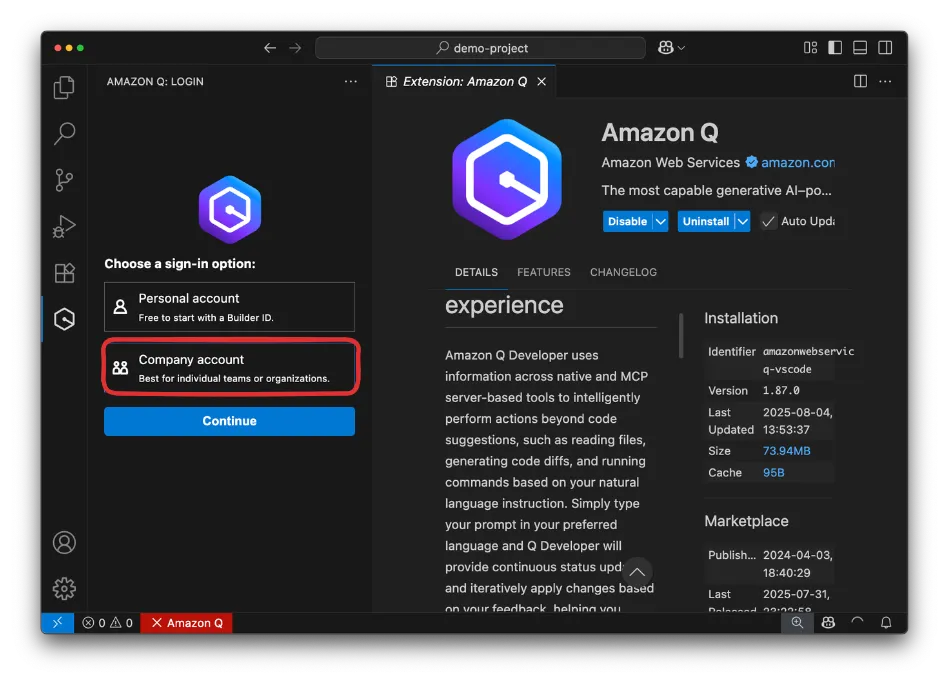
Amazon Q Developer targets developers working heavily with AWS services. Deep AWS knowledge unmatched by competitors.
Key Features
- Deep AWS service knowledge across hundreds of products
- Reference tracking cites code sources avoiding licensing issues
- Built-in security scanning catches vulnerabilities early
- Agentic capabilities autonomously implement features and run tests
- Integration with AWS billing for enterprise adoption
Autonomous Implementation
Q Developer can implement complete features like “implement user authentication with Cognito” while you work on other tasks.
Best For
Teams building applications on AWS infrastructure. DevOps engineers managing AWS resources. Enterprises invested in AWS ecosystem.
Pros:
- Uncompromising privacy with local deployment
- Air-gapped operation possible
- Customizable models for specific codebases
- Compliance-friendly for regulated industries
Cons:
- Local models less capable than cloud alternatives
- Requires significant hardware resources
- Suggestions feel more conservative
- Higher cost for enterprise deployments
7. Replit: Instant Development Environment

Replit runs entirely in your browser. No local setup, no configuration, no device limitations.
Key Features
- Browser-based IDE with zero local setup
- AI generates complete applications from text descriptions
- Instant deployment with permanent URLs
- Real-time collaboration for multiple developers
- Support for 50+ programming languages with integrated databases
Collaboration
Multiple developers code together in real-time. Share a link and everyone works on identical code instantly.
Limitations
Performance lags for very large projects. Browser dependency eliminates offline work.
Best For
Students learning to code. Teachers running coding workshops. Developers building quick prototypes or MVPs. Teams valuing collaboration over local development power.
8. ChatGPT: The Versatile All-Rounder

ChatGPT isn’t a code editor but millions of developers use it daily for coding help. Conversational interface excels at learning, debugging, and exploring concepts.
Key Features
- Natural language conversations about code and programming concepts
- Code generation across virtually any programming language
- Error message debugging with clear explanations
- Code Interpreter for writing and executing Python
- Image upload for debugging visual errors or diagrams
Strengths
Explains complex code in plain language. Suggests alternative approaches when stuck. Helps understand cryptic error messages. Great for exploring new frameworks through conversation.
Integration
Works best alongside main IDE, not replacing it. Copy code from chat to editor adds friction but explanation quality makes it worthwhile.
Best For
Developers learning new languages or frameworks. Anyone preferring understanding over speed. Debugging experts needing second opinions. Teams valuing versatility over specialized features.
9. Claude Code: Terminal-Native AI

Claude Code brings Anthropic’s language models directly to command line. Natural integration for developers who live in terminal.
Key Features
- Terminal-native operation without leaving command line
- Context retention across multiple sessions and days
- Script generation and automation directly in terminal
- Log analysis and troubleshooting from command line
- Integration with existing terminal workflows
Reasoning Advantage
Claude excels at explaining why certain approaches work better. Valuable for architectural decisions beyond simple code completion.
Best For
Terminal enthusiasts rarely leaving command line. DevOps engineers managing infrastructure through scripts. Developers valuing reasoning and explanation over raw speed.
10. Pieces for Developers: Code Management Meets AI

Pieces manages, saves, and reuses snippets across projects. AI enhances core workflow rather than replacing it.
Key Features
- Automatic snippet capture with contextual metadata
- Copilot references your saved code in suggestions
- Offline capability with local model execution
- Multi-model support for choosing preferred AI models
- Privacy-focused design keeps everything on your machine
Value
Solves problems developers face repeatedly across projects. Builds personal knowledge base that becomes more valuable over time.
Best For
Developers frequently reusing patterns across projects. Teams building similar applications repeatedly. Privacy-conscious developers wanting local AI execution.
Detailed Feature Comparison
Here’s a breakdown of specific capabilities across all tools:
| Feature | GitHub Copilot | Cursor | Windsurf | Cody | Tabnine |
| Code Completion | Excellent | Excellent | Good | Good | Good |
| Codebase Awareness | Limited | Excellent | Good | Excellent | Limited |
| Multi-file Editing | Via Agent | Excellent | Good | Good | Limited |
| Offline Capability | No | No | No | No | Yes |
| Custom Models | No | Limited | No | No | Yes |
| Learning Curve | Easy | Moderate | Easy | Moderate | Easy |
| Feature | Amazon Q | Replit | ChatGPT | Claude Code | Pieces |
| Code Completion | Good | Good | N/A | Limited | Good |
| Codebase Awareness | Limited | Limited | N/A | Limited | Good |
| Multi-file Editing | Good | Good | N/A | Good | Limited |
| Offline Capability | No | No | No | No | Yes |
| Custom Models | No | No | No | No | Yes |
| Learning Curve | Easy | Very Easy | Very Easy | Easy | Easy |
Common Mistakes When Using AI Code Generators
Blindly Accepting Everything
AI-generated code contains bugs, security vulnerabilities, or inefficient patterns. Always review suggestions, especially for production code.
The 30% acceptance rate for GitHub Copilot exists for a reason. Experienced developers reject 70% of generated code after review.
Over-Reliance Stunts Growth
Tools should accelerate workflow, not replace fundamental understanding. Learn concepts, then use AI to speed implementation.
The METR study showing 19% slowdown partly resulted from over-reliance on AI.
Ignoring Context
Clear, specific prompts with good context generate better results. “Make this better” produces mediocre output. “Optimize this function for memory efficiency in Python” generates better code.
Tool-Hopping
Mastering one AI assistant delivers more value than superficially using three. Teams using 3+ AI coding tools simultaneously show 34% lower productivity than teams using 1-2 tools effectively.
How to Choose the Right Tool
Maximum compatibility: GitHub Copilot works with virtually every IDE.
Complex projects: Cursor provides sophisticated codebase understanding and multi-agent capabilities.
New to AI coding: Windsurf offers gentlest learning curve.
Large codebases: Cody excels at understanding millions of lines of code.
Security requirements: Tabnine provides local deployment with complete data privacy.
AWS development: Amazon Q Developer knows AWS better than alternatives.
Quick prototypes: Replit gets from idea to deployed application fastest.
Learning focus: ChatGPT provides best explanations and educational value.
Terminal workflows: Claude Code integrates naturally with command-line.
Pattern reuse: Pieces builds personal knowledge base of solutions.
Many developers use multiple tools. GitHub Copilot for daily work, ChatGPT for learning, Cursor for complex projects maximizes strengths while minimizing weaknesses.
The Reality of AI Coding in 2025
76% of developers experience frequent AI hallucinations and have low confidence in generated code. Only 3.8% report both low hallucination rates and high confidence.
The productivity paradox: teams complete 126% more projects but individual tasks take 19% longer.
Yet AI investment exploded from $600 million to $4.6 billion in 2024 – an 8x increase driven by measurable gains in specific scenarios.
AI coding tools deliver massive value in the right situations with proper implementation. Blindly adopting tools or expecting magic won’t work.
Final Thoughts
AI code generators are becoming more sophisticated and essential to modern development.
GitHub Copilot offers reliability and broad compatibility. Cursor pushes boundaries with AI-first development. Windsurf makes AI accessible to beginners. Each tool excels in specific scenarios.
Start with one tool, master it, then expand based on actual needs. The developers who thrive aren’t fighting AI – they’re learning to work alongside it effectively.
Frequently Asked Questions
Which AI code generator is completely free?
Replit provides browser-based environment with AI features at no cost. GitHub Copilot is free for verified students and open-source maintainers. ChatGPT’s free tier handles many coding tasks.
Can AI replace human developers?
No. AI tools augment developers rather than replacing them. They excel at boilerplate code but struggle with complex architecture decisions and creative problem-solving. Most productive developers use AI for tedious tasks while focusing expertise on higher-level challenges.
How secure is AI-generated code?
AI-generated code can contain security vulnerabilities. Always review suggestions, especially for production. Treat AI suggestions as starting points requiring human review, testing, and validation.
Do I need coding knowledge to use these tools?
Basic programming knowledge is essential. You need to understand what good code looks like to evaluate AI suggestions. Complete beginners struggle spotting errors. Start with programming fundamentals, then use AI to accelerate growth.
Can I use multiple AI tools together?
Yes. Many developers use GitHub Copilot for daily autocomplete, ChatGPT for debugging, and Cursor for complex refactoring. Each tool has strengths worth leveraging.