This may take few seconds.

0% Completed

Letterhead Generators · Freemium
Canva Letterhead Maker logo - Letterhead Generators

Canva Letterhead Maker

Canva Letterhead Maker lets you design a free, professional letterhead from 1M+ templates with a drag-and-drop editor, brand elements and Magic Studio AI, then download a high-quality PDF or order prints through Canva Print.

  • letterhead generator
  • canva
  • letterhead maker
  • free letterhead
  • letterhead templates
  • canva print
  • business stationery
  • brand kit
  • pdf letterhead
  • drag and drop
Visit Website

Updated Oct 12, 2026

Pricing Freemium

Rating No reviews yet

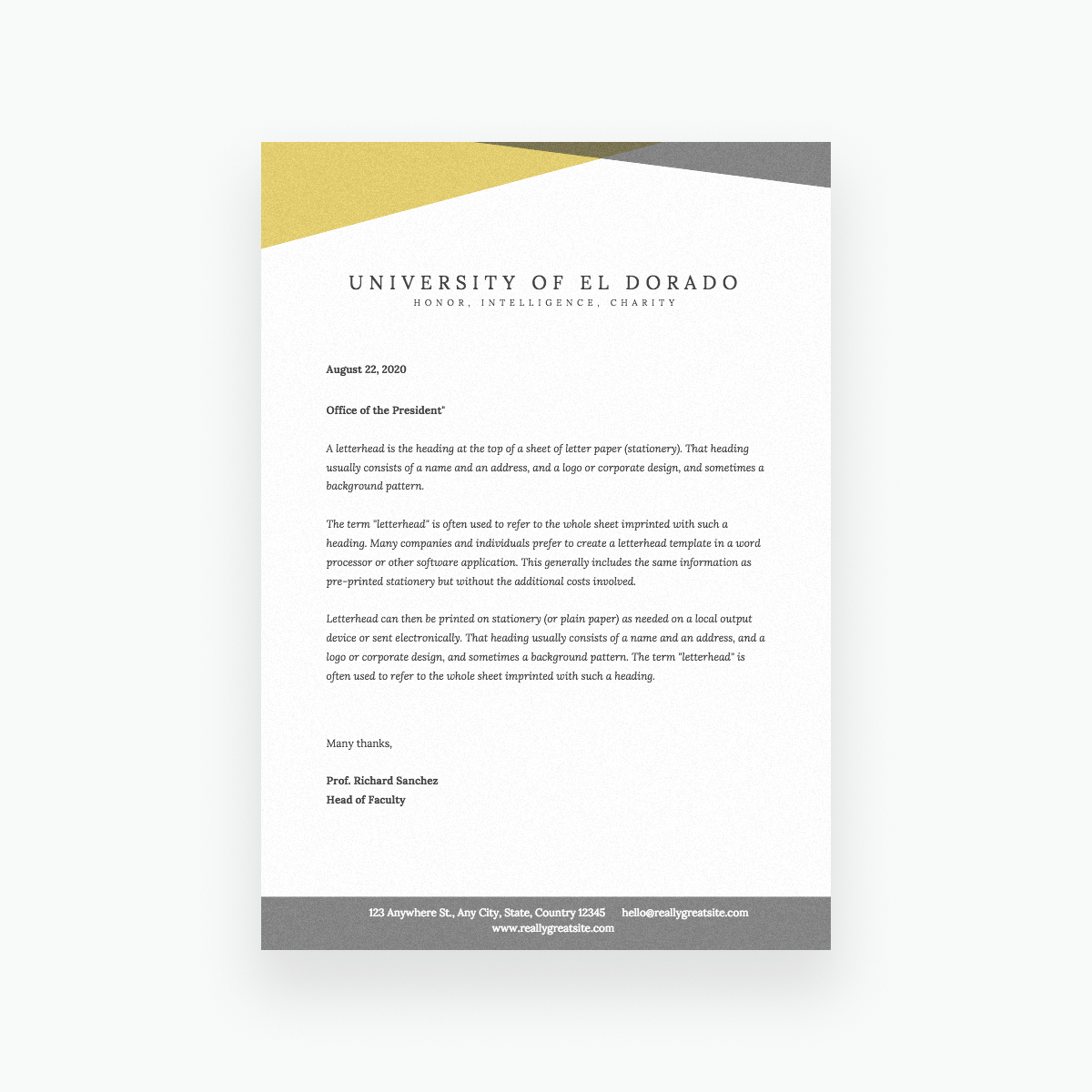
Canva Letterhead Maker preview - Letterhead Generators

Standout Features

What makes Canva Letterhead Maker stand out

  • 1M+ templates
  • Free design and download
  • Canva Print delivery
  • Brand Kits and Magic Studio AI

Key Features

What’s in the toolkit?

  • 01

    1M+ templates

  • 02

    Drag-and-drop editor

  • 03

    Stock photos, icons and illustrations

  • 04

    Logo and brand element upload

  • 05

    Brand Kits (paid)

  • 06

    Magic Write and Magic Media

  • 07

    Magic Edit and Magic Eraser (Pro)

  • 08

    Team editing via link

  • 09

    High-quality PDF download

  • 10

    Image download

  • 11

    Canva Print with paper and finish options

  • 12

    Web, iOS and Android apps

What is Canva Letterhead Maker?

Communicate effectively with a stunning letterhead design

Canva Letterhead Maker uses Canva's drag-and-drop editor to create branded letterheads from templates or from scratch.

Letterhead features

  • 1M+ templates plus millions of photos, icons and illustrations.
  • Upload your logo and brand colors, with Brand Kits on paid plans.
  • Magic Studio AI tools such as Magic Write.
  • Team editing via shared links.
  • Download PDF or image, or print with Canva Print.

Why use it

Canva makes it free and easy for anyone to create a polished letterhead and print it on quality paper delivered to your door. It's one of the most popular letterhead generators.


Pricing
Freemium
Company
Canva Pty Ltd
Platform Access
1 feature

Use Cases

Where teams put it to work

  • 01

    Company letterheads

  • 02

    Freelancer stationery

  • 03

    Invoices and proposals

  • 04

    Printed letterhead orders

Workflow

How to use Canva Letterhead Maker?

  1. 01

    Open Canva's letterhead maker.

  2. 02

    Pick a template or start blank.

  1. 03

    Add your logo , colors and contact details.

  2. 04

    Download PDF or order prints.

Pros & Cons

Is Canva Letterhead Maker right for you?

Pros

3
  • Free to create and download
  • Huge template library
  • Printing built in

Cons

2
  • Brand Kits limited on free plan
  • Templates aren't exclusive

Pricing

Pricing for Canva Letterhead Maker

Freemium
  • Free – $0: templates and downloads.
  • Pro – $144/year: 5 Brand Kits, premium content and AI tools.
  • Business – $250/year per person.
  • Enterprise: contact sales.

Printing is priced separately.

Who is it for

Who is Canva Letterhead Maker for?

Small businesses.Freelancers.Teams already using Canva.
FAQ

Frequently Asked Questions

Everything you need to know about Canva Letterhead Maker before you try it.

No. You can use plain stationery after the first page.

A heading at the top with your logo, business name and contact information.

Your name, logo, contact details and website; sole traders may add a company registration number, and partnerships should name all partners.

Reviews

Canva Letterhead Maker Reviews

Real experiences from people who use Canva Letterhead Maker. Share yours to help others choose the right tool.

0.0/5

No reviews yet

5
0%
4
0%
3
0%
2
0%
1
0%

No reviews yet

Have you used Canva Letterhead Maker? Be the first to share your experience and help others decide.

Write a review

How would you rate Canva Letterhead Maker?

0/2000

Your email is never shown publicly. Reviews appear after a quick check by our team.

Explore More Similar Tools

More tools worth checking out from the same category.

Never Miss a New AI Tool

Subscribe to get the latest AI tools, deals, and resources delivered straight to your inbox — no spam, unsubscribe anytime.