This may take few seconds.

0% Completed

Graphic Design · Freemium
Photopea logo - Graphic Design

Photopea

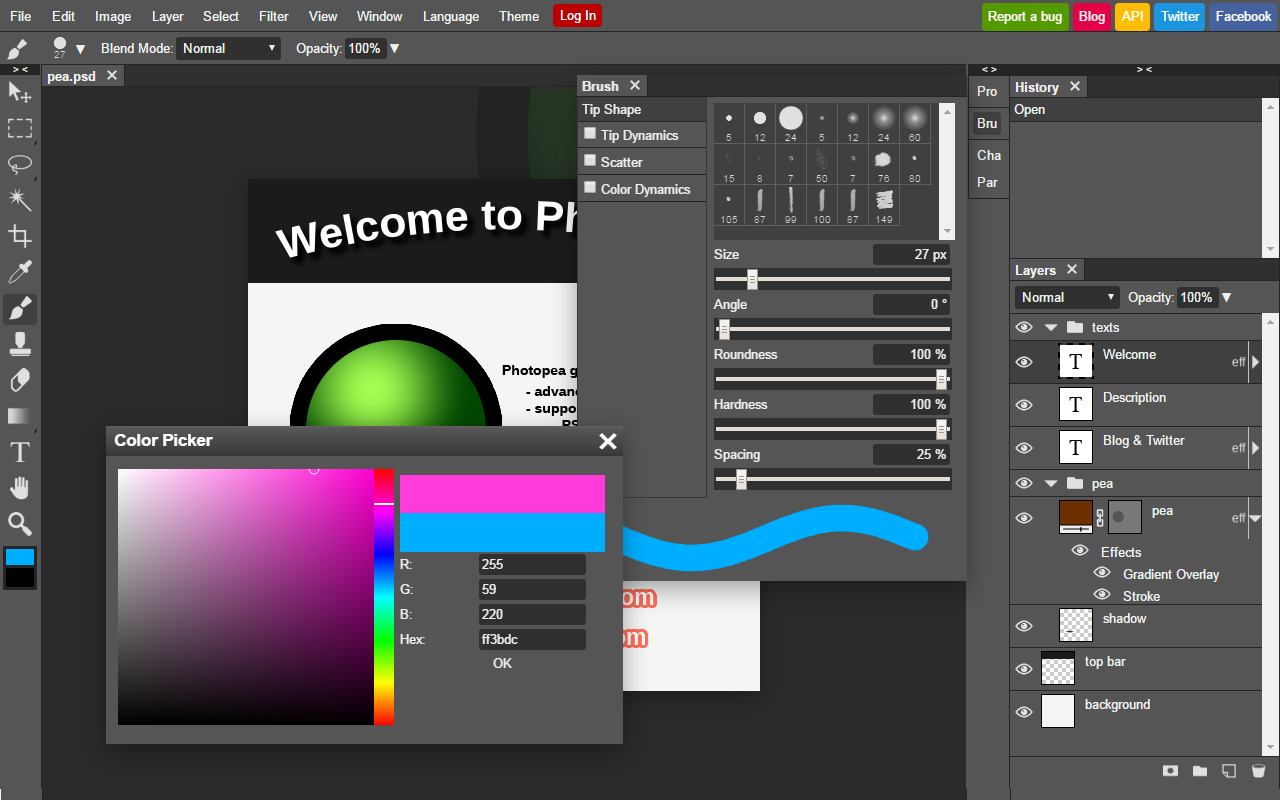
Photopea is a free browser-based photo editor that works like Photoshop, with layers, masks, smart objects and full PSD support, opening AI, SVG, PDF, Figma and RAW files, plus AI background removal, all processed on your device.

  • graphic design
  • photopea
  • free photo editor
  • photoshop alternative
  • psd editor
  • online editor
  • layers
  • browser
  • raw editing
  • free
Visit Website

Updated Oct 12, 2026

Pricing Freemium

Rating No reviews yet

Photopea preview - Graphic Design

Standout Features

What makes Photopea stand out

  • Free Photoshop-like editor
  • Full PSD support
  • Runs in your browser
  • Opens 40+ formats

Key Features

What’s in the toolkit?

  • 01

    Layers and masks

  • 02

    Layer styles

  • 03

    Smart objects

  • 04

    Adjustment layers

  • 05

    Channels and paths

  • 06

    PSD open and save

  • 07

    Opens AI, SVG, PDF, Figma, HEIC and more

  • 08

    RAW support

  • 09

    Liquify and Puppet Warp

  • 10

    Vector editing

  • 11

    AI background removal

  • 12

    AI content replacement

  • 13

    API

What is Photopea?

Unlock your creativity with the best free photo editor

Photopea is a free online photo editor that runs entirely in your browser, keeping files on your device.

Key capabilities

  • Layers, masks, layer styles and smart objects.
  • Full PSD open and save.
  • Opens 40+ formats including AI, SVG, PDF, Figma and RAW.
  • Liquify, Puppet Warp, curves and levels.
  • AI background removal and content replacement.

Who it's for

Photopea is the most popular free Photoshop alternative and an accessible graphic design tool for everyone.


Pricing
Freemium
Company
Photopea
Platform Access
2 features

Use Cases

Where teams put it to work

  • 01

    Photo editing

  • 02

    PSD editing without Photoshop

  • 03

    Quick graphics

  • 04

    Mockup editing

Workflow

How to use Photopea?

  1. 01

    Open photopea.com.

  2. 02

    Open a file or create new.

  1. 03

    Edit with layers and tools.

  2. 04

    Export your image.

Pros & Cons

Is Photopea right for you?

Pros

3
  • Free with no install
  • Familiar Photoshop-style interface
  • Privacy: files stay on device

Cons

2
  • Ads on the free version
  • Web only

Pricing

Pricing for Photopea

Freemium

Photopea is free with ads. Premium removes ads (about $5/month or $50/year per a third-party source, July 2026), and Team Premium covers whole teams.

Who is it for

Who is Photopea for?

Budget-conscious designers.Students.Anyone needing quick PSD edits.
Reviews

Photopea Reviews

Real experiences from people who use Photopea. Share yours to help others choose the right tool.

0.0/5

No reviews yet

5
0%
4
0%
3
0%
2
0%
1
0%

No reviews yet

Have you used Photopea? Be the first to share your experience and help others decide.

Write a review

How would you rate Photopea?

0/2000

Your email is never shown publicly. Reviews appear after a quick check by our team.

Explore More Similar Tools

More tools worth checking out from the same category.

Never Miss a New AI Tool

Subscribe to get the latest AI tools, deals, and resources delivered straight to your inbox — no spam, unsubscribe anytime.