This may take few seconds.

0% Completed

3D Animation Generator · Freemium
plask-motion-logo

Plask Motion

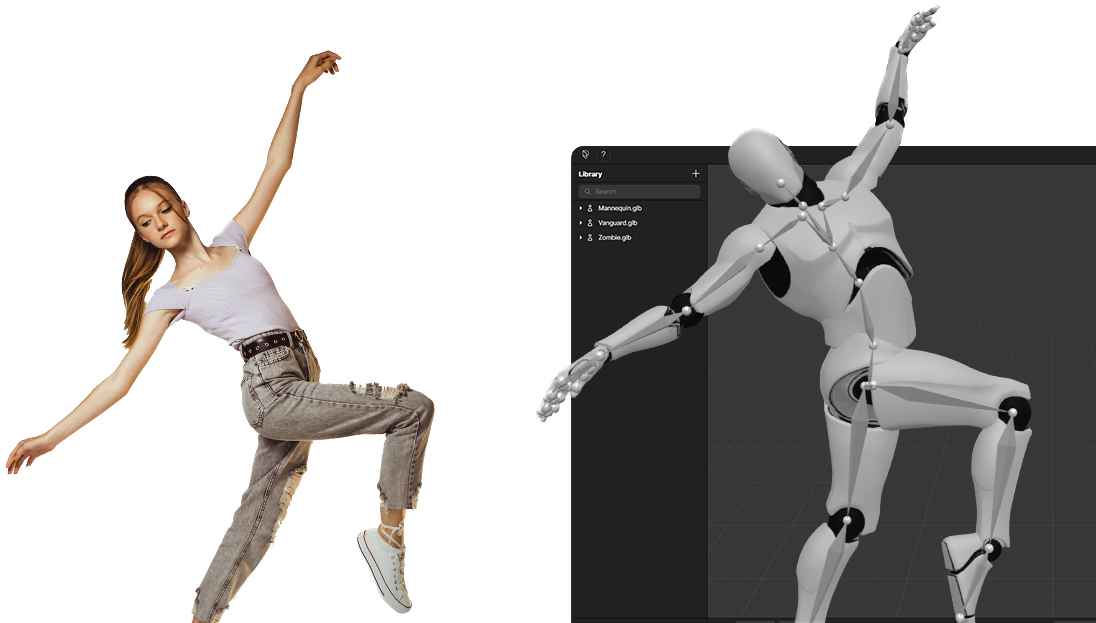
Plask Motion is a browser-based AI motion capture and 3D animation tool that converts single-camera video into studio-quality full-body and hand animation, with multi-person capture, real-time collaboration and FBX, GLB and BVH export.

  • ai motion capture
  • video to 3d animation
  • markerless mocap
  • 3d animation
  • hand tracking
  • multi-person mocap
  • vrm animation
  • mmd animation
  • game animation
  • fbx export
  • 3d
  • animation
  • generator
  • ai
  • tools
Visit Website
Updated:
Pricing:
Freemium
Rating:
No reviews yet
plask-motion-thumbnail

Standout Features

What makes Plask Motion stand out

  • Single-camera full-body and hand capture
  • Multi-person motion capture
  • AI-assisted camera, lighting and post-processing
  • MMD and VRM model support with physics

Key Features

What’s in the toolkit?

  • 01

    AI motion capture from single-camera video

  • 02

    Full-body and hand capture

  • 03

    Multi-person motion capture

  • 04

    Custom 3D model upload

  • 05

    MMD and VRM support with blinking and physics

  • 06

    AI-assisted camera and lighting

  • 07

    Post-processing effects (motion blur, depth of field, tone mapping)

  • 08

    Video rendering

  • 09

    FBX, GLB and BVH export

  • 10

    Scene sharing

  • 11

    Real-time collaboration

  • 12

    Unreal Engine, Unity, Maya and Blender workflows

What is Plask Motion?

Turn any video into professional 3D animation with AI motion capture

Plask Motion is an AI-powered motion capture and animation platform that transforms ordinary video into professional 3D animation, without suits, sensors or a mocap studio. Capture from a single camera, apply the motion to your characters, and polish the result in a full 3D scene editor that runs in your browser.

AI motion capture from video

Plask's AI extracts full-body and hand motion from a single video with high accuracy, and supports multi-person motion capture so several performers can be captured from one clip. Characters can be your own uploaded models, including MMD and VRM models with blinking and physics support.

Built-in cinematography and post-processing

Beyond raw mocap data, Plask works like a virtual studio. AI-assisted cinematography handles camera and lighting automatically, and Hollywood-grade post-processing effects such as vignettes, motion blur, depth of field and tone mapping help you render polished videos directly from the platform.

Fits your pipeline

Export animations as FBX, GLB or BVH for Unreal Engine, Unity, Maya and Blender, or render finished video. Scene sharing and real-time collaboration let teams work on the same project together. With a free plan, 7-day trials on paid plans and academic discounts, Plask is one of the most accessible 3D animation generator tools for game developers, filmmakers and dance and VTuber creators.


Pricing
Freemium
Company
Plask
Platform Access
1 feature

Use Cases

Where teams put it to work

  • 01

    Game character animation

  • 02

    Film and video production

  • 03

    VTuber and virtual content creation

  • 04

    Dance and short-form social videos

  • 05

    Previsualization and prototyping

  • 06

    Professional 3D animation projects

Workflow

How to use Plask Motion?

  1. 01

    Sign up free at plask.ai and open Plask Motion in your browser.

  2. 02

    Upload a video recorded with a single camera (one or more performers).

  3. 03

    Run AI motion capture to extract full-body and hand animation.

  1. 04

    Apply it to a character. Use a default model or upload your own, including MMD and VRM models.

  2. 05

    Polish and export. Set up cameras, lighting and effects, then export FBX, GLB or BVH for Unreal, Unity, Maya or Blender, or render a finished video.

Pros & Cons

Is Plask Motion right for you?

Pros

8
  • Free plan with daily mocap seconds
  • Captures full body and hands from one camera
  • Multi-person capture included on all plans
  • Exports FBX, GLB and BVH
  • Built-in camera, lighting and render effects
  • Real-time collaboration
  • 7-day free trial on paid plans
  • Academic discounts available

Cons

4
  • Free plan limited to 15 seconds of capture per day
  • Free storage capped at 1 GB
  • Listed paid prices are billed yearly
  • Monthly capture caps on paid plans

Pricing

Pricing for Plask Motion

Freemium

Plask Motion offers a freemium model; listed paid prices are billed yearly.

  • Freemium – Free: 15 seconds of motion capture per day, 1 GB storage.
  • Standard – $18/month: 10 minutes of motion capture per month, 3 GB storage.
  • Pro – $50/month: 1 hour of motion capture per month, 10 GB storage.

All plans include full-body and hand capture, multi-person mocap, FBX/GLB/BVH export, video rendering, scene sharing, real-time collaboration, auto camera and lighting, and customizable effects. Standard and Pro come with a 7-day free trial, and academic discounts are available. Check plask.ai/pricing for current rates.

Who is it for

Who is Plask Motion for?

Game developers and indie studios needing affordable character animation.Filmmakers and 3D animators producing previs and finished scenes.VTubers and MMD/VRM creators animating virtual characters.Dance and social content creators making 3D short-form videos.Students and educators (academic discounts available).
Reviews

Plask Motion Reviews

Real experiences from people who use Plask Motion. Share yours to help others choose the right tool.

0.0/5

No reviews yet

5
0%
4
0%
3
0%
2
0%
1
0%

No reviews yet

Have you used Plask Motion? Be the first to share your experience and help others decide.

Write a review

How would you rate Plask Motion?

0/2000

Your email is never shown publicly. Reviews appear after a quick check by our team.

Explore More Similar Tools

More tools worth checking out from the same category.

Never Miss a New AI Tool

Subscribe to get the latest AI tools, deals, and resources delivered straight to your inbox — no spam, unsubscribe anytime.