This may take few seconds.

0% Completed

Color Palette Generator · Freemium
ui-colors-logo

UI Colors

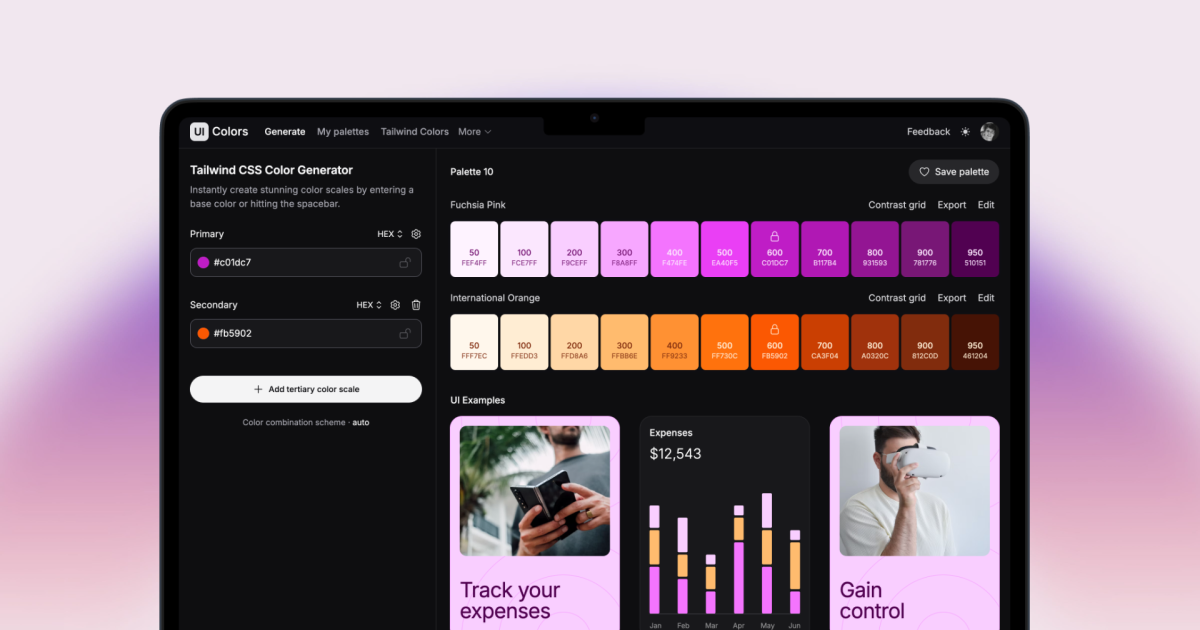
UI Colors generates Tailwind CSS color shades from a HEX or HSL color, builds brand, neutral and status scales, and previews them on components, dashboards and shadcn/ui, with a Figma plugin.

  • color palette generator
  • ui colors
  • tailwind css
  • color shades
  • shadcn
  • figma plugin
  • design tokens
  • developers
  • ui designers
Visit Website
Updated:
Pricing:
Freemium
Rating:
No reviews yet
ui-colors-thumbnail

Standout Features

What makes UI Colors stand out

  • Perfect Tailwind scales from one color

Key Features

What’s in the toolkit?

  • 01

    Tailwind shades from one color

  • 02

    Brand, neutral and status scales

  • 03

    Previews on components and shadcn/ui

  • 04

    Saved palettes and tokens

  • 05

    Figma plugin

  • 06

    API

What is UI Colors?

Tailwind CSS color shade generator

UI Colors generates Tailwind CSS color shades from a HEX or HSL color, builds brand, neutral and status scales, and previews them on components, dashboards and shadcn/ui, with a Figma plugin.

Key capabilities

  • Tailwind shades from one color.
  • Brand, neutral and status scales.
  • Previews on components and shadcn/ui.
  • Saved palettes and tokens.
  • Figma plugin.

Who it's for

UI Colors is a free color palette generator.

Pricing
Freemium
Company
UI Colors
Platform Access
1 feature

Use Cases

Where teams put it to work

  • 01

    Tailwind color scales

  • 02

    Design system tokens

  • 03

    Brand color shades

Workflow

How to use UI Colors?

  1. 01

    Enter your key or brand colors.

  2. 02

    Set steps, curves or target contrast ratios.

  1. 03

    Review the scale and contrast results.

  2. 04

    Export tokens, CSS or Figma styles.

Pros & Cons

Is UI Colors right for you?

Pros

2
  • Accurate Tailwind output
  • Great previews

Cons

2
  • Some features need Pro
  • Tailwind-centric

Pricing

Pricing for UI Colors

Freemium

Free to generate and edit shades; Pro unlocks extra features such as custom fonts. See uicolors.app for pricing.

Who is it for

Who is UI Colors for?

UI designers.Front-end developers.Design system teams.
Reviews

UI Colors Reviews

Real experiences from people who use UI Colors. Share yours to help others choose the right tool.

0.0/5

No reviews yet

5
0%
4
0%
3
0%
2
0%
1
0%

No reviews yet

Have you used UI Colors? Be the first to share your experience and help others decide.

Write a review

How would you rate UI Colors?

0/2000

Your email is never shown publicly. Reviews appear after a quick check by our team.

Explore More Similar Tools

More tools worth checking out from the same category.

Never Miss a New AI Tool

Subscribe to get the latest AI tools, deals, and resources delivered straight to your inbox — no spam, unsubscribe anytime.